
Last updated on
Nov 6, 2026

Get the free Tennessee Certificate of Immunization
We are not affiliated with any brand or entity on this form

Fill out
Complete the form online in a simple drag-and-drop editor.

eSign
Add your legally binding signature or send the form for signing.

Share
Share the form via a link, letting anyone fill it out from any device.

Export
Download, print, email, or move the form to your cloud storage.
Why pdfFiller is the best tool for your documents and forms


End-to-end document management
From editing and signing to collaboration and tracking, pdfFiller has everything you need to get your documents done quickly and efficiently.
Accessible from anywhere
pdfFiller is fully cloud-based. This means you can edit, sign, and share documents from anywhere using your computer, smartphone, or tablet.
Secure and compliant
pdfFiller lets you securely manage documents following global laws like ESIGN, CCPA, and GDPR. It's also HIPAA and SOC 2 compliant.
What is TN Immunization Form
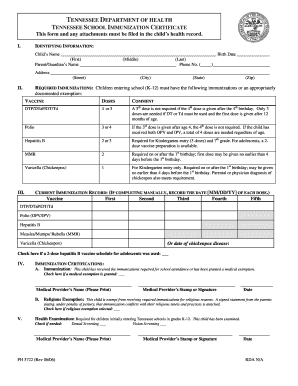
The Tennessee Certificate of Immunization is a healthcare form used by parents and healthcare providers to document a child's immunization history for school and child care attendance in Tennessee.
pdfFiller scores top ratings on review platforms




Excellent way to create forms which I use in my classes. I like that I can edit pdf files.
PDFiller has made my business run smoother. Thank you for the easy to fill experience! My favorite feature has to be the Chrome add on extension.
Who needs TN Immunization Form?
Explore how professionals across industries use pdfFiller.

TN Immunization Form is needed by:
-
Parents/Guardians of school-aged children in Tennessee
-
Healthcare Providers administering vaccinations
-
Schools requiring immunization documentation
-
Child care facilities for admission requirements
-
State health department officials for compliance
-
Legal guardians handling vaccine records
Comprehensive Guide to TN Immunization Form
What is the Tennessee Certificate of Immunization?
The Tennessee Certificate of Immunization is a required healthcare form that documents a child's immunization history for school and child care attendance in Tennessee. This certificate is mandatory and requires signatures from both the healthcare provider and the parent or guardian. By maintaining accurate immunization records, this form ensures that children are protected from vaccine-preventable diseases, which is vital for public health.
Purpose and Importance of the Tennessee Certificate of Immunization
This certificate serves a crucial role in child health and safety by complying with legal requirements for school and child care attendance. Parents must submit this form to prevent delays in enrollment and ensure children can participate in educational activities safely. Without it, children may face exclusion from school or child care, highlighting the need for timely documentation of vaccinations.
Who Needs the Tennessee Certificate of Immunization?
The primary stakeholders for this immunization form are parents or guardians and healthcare providers. Children attending schools or child care facilities need to meet eligibility criteria to ensure their vaccinations are up to date. It is also essential to understand that exemptions may be allowed in specific circumstances, such as for religious or medical reasons.
Required Information and Fields in the Tennessee Certificate of Immunization
When completing the Tennessee Certificate of Immunization, several essential fields must be accurately filled out, including the child's name, birthdate, and vaccination dates. Additional information required includes parent or guardian details, such as name and contact information, and potential exemptions. The form also features checkboxes for any additional documentation required.
How to Fill Out the Tennessee Certificate of Immunization Online (Step-by-Step)
To complete the Tennessee Certificate of Immunization online, follow these steps:
-
Access the online form through a secure platform.
-
Fill in the child's full name and birthdate in the designated fields.
-
Enter all relevant vaccination dates and healthcare provider information.
-
Provide details for the parent or guardian, including name and contact information.
-
Select any applicable exemptions and ensure all required fields are completed.
-
Review the form for accuracy to avoid common pitfalls before submission.
How to Submit the Tennessee Certificate of Immunization
The submission of the Tennessee Certificate of Immunization can be done in several ways, including online, by mail, or in-person at the designated location. Be mindful of any associated fees or necessary documents for a successful submission. Additionally, parents should be aware of school enrollment deadlines to ensure the timely submission of the form.
Consequences of Not Submitting the Tennessee Certificate of Immunization on Time
If the Tennessee Certificate of Immunization is not submitted by the required deadlines, children may face significant issues, including the inability to enroll in school or child care. Non-compliance can lead to legal ramifications and health risks, with potential consequences including delayed entrance into educational programs or outright rejection from schools.
Security and Compliance with the Tennessee Certificate of Immunization
Ensuring the security of sensitive health information when handling the Tennessee Certificate of Immunization is paramount. It is essential to comply with regulations such as HIPAA and GDPR while processing this certificate. Users can feel assured that platforms like pdfFiller maintain robust security measures, utilizing 256-bit encryption to protect their data.
Why Choose pdfFiller for Your Tennessee Certificate of Immunization
pdfFiller offers numerous advantages for managing healthcare forms, including the Tennessee Certificate of Immunization. Key features include cloud-based editing that allows for easy modifications, eSigning capabilities, and secure sharing options. The platform is designed for efficiency, making it simple for users to create, manage, and store their documents securely.
Ready to Get Started with Your Tennessee Certificate of Immunization?
Utilizing pdfFiller to streamline the process of completing your forms simplifies your experience and ensures accuracy. The online platform is designed to facilitate a seamless transition in filling out and submitting the Tennessee Certificate of Immunization, enhancing overall user satisfaction.
How to fill out the TN Immunization Form
-
1.To access the Tennessee Certificate of Immunization, visit pdfFiller and log into your account. If you do not have an account, you can create one quickly.
-
2.Once logged in, use the search bar to locate 'Tennessee Certificate of Immunization' or browse through healthcare forms to find it.
-
3.Open the form in the pdfFiller editor to start filling it out. Review the required fields and ensure you have the necessary information ready before beginning.
-
4.Gather the essential details such as the child's full name, birthdate, and vaccination dates. You may also need the parent’s or guardian's contact information.
-
5.Begin filling the form by clicking on each blank field. Enter the child's name and birthdate accurately, and then fill in the vaccine dates as per the records.
-
6.Use checkboxes for any exemptions like religious beliefs or medical conditions. Ensure you provide accurate information to avoid delays or issues.
-
7.After filling in all required fields, review the entire form for correctness. Ensure all necessary information is accurately provided before proceeding.
-
8.Once satisfied, you can save the completed form or download it directly as a PDF. Use the options provided in pdfFiller to submit it electronically if required by your school or child care facility.

Who can sign the Tennessee Certificate of Immunization?
The Tennessee Certificate of Immunization must be signed by both the healthcare provider who administers the vaccines and the parent or guardian of the child.
What information is required on the Tennessee immunization form?
You need to provide the child's name, birthdate, vaccination dates, and information about the parent or guardian. It's also important to indicate if there are any exemptions.
Is there a deadline for submitting the Certificate of Immunization?
Yes, the Certificate of Immunization must be submitted to schools or child care facilities before the deadline set by the institution or state regulations, often before the school year starts.
How do I submit the completed form?
You can submit the completed Tennessee Certificate of Immunization by providing a physical copy to the school or daycare, or electronically if the facility allows for online submission.
What are common mistakes to avoid when filling out this form?
Make sure to double-check all input information, especially the child's name and vaccination dates. Ensure signatures are complete and exemptions are clearly marked to prevent processing delays.
Are there any fees for processing the immunization form?
Typically, there are no fees directly associated with processing the Tennessee Certificate of Immunization; however, some healthcare providers may charge for immunization services.
Where can I find a blank Certificate of Immunization form?
The blank Tennessee Certificate of Immunization can be accessed online through pdfFiller or through your local health department and schools that provide the form.
Related Content
Related Forms





Related Catalogs
Get the latest insights from our blog


If you believe that this page should be taken down, please follow our DMCA take down process
here
.
This form may include fields for payment information. Data entered in these fields is not covered by PCI DSS compliance.